

Database teams have more options than ever for managing MySQL environments, but the choice often comes down to a fundamental question: should you install a desktop client on every machine, or give your team browser-based access to a centralized platform? The answer depends less on personal preference and more on how your team works, where your data lives, and how much control you need over access and security.
The Case for Desktop Tools
Desktop MySQL GUI clients have been the default for decades, and for good reason. They tend to offer the deepest feature sets, the snappiest performance for large result sets, and a familiar workflow for DBAs who've used the same software for years. A desktop application also doesn't depend on network latency to render every click, which matters when you're scrolling through millions of rows or running visual query builders.
The downside is fragmentation. Every team member needs the software installed and licensed on their own machine, configurations live locally, and there's no easy way to see what a colleague is working on. If someone leaves the company or works from a new laptop, getting them back up to speed takes real setup time.
Why Web-Based Tools Are Gaining Ground
Web-based database tools solve the fragmentation problem by centralizing everything behind a browser. Instead of distributing connection settings, scripts, and credentials across individual machines, a team accesses a shared environment from anywhere with a login. This is especially valuable for distributed or hybrid teams, where coordinating database changes across time zones used to mean a lot of Slack messages and screen shares.
Web tools also simplify governance. Administrators can control who sees which databases, track activity in real time, and revoke access instantly rather than chasing down local installs. The tradeoff historically was that browser-based tools couldn't match the depth of desktop applications, but that gap has narrowed considerably.
A Hybrid Approach: Navicat On-Prem Server
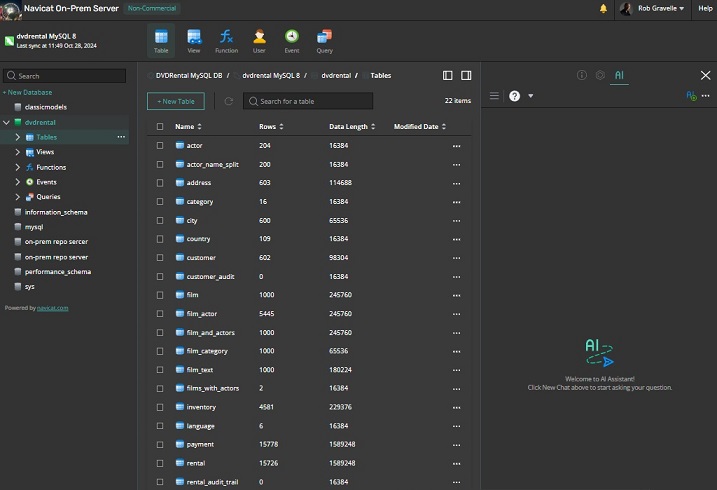
Blurring the line between these two models, Navicat On-Prem Server is a web-based, on-premise platform built to support team collaboration around MySQL, MariaDB, and PostgreSQL database management. Rather than replacing desktop tools outright, it's designed to complement them: Navicat's desktop applications connect to the On-Prem Server to synchronize connections, queries, snippets, and model workspaces, while the web portal itself provides direct access for administering, monitoring, and managing databases from a browser.
Because it's deployed on your own infrastructure rather than a third-party cloud, organizations keep full control over data residency and security while still getting cloud-style convenience. Teams can work on shared projects, assign role-based permissions to control who can view, create, or edit specific objects, and review a live activity log to see what colleagues are doing across a project. Notifications via SMS or email can flag server updates or security events, and support for LDAP/AD integration makes it easier to plug into existing identity systems rather than managing a separate set of user accounts.
For day-to-day database work, it covers the essentials you'd expect from a MySQL GUI: browsing and editing tables, views, stored procedures, and functions, managing users and privileges, and running queries through a built-in editor - all without requiring every team member to install separate software. It also extends to PostgreSQL management, plus several cloud-hosted database variants from major providers, making it an excellent fit for teams running mixed environments rather than MySQL alone.
Version 3.1 added a set of AI-powered tools to the platform. An AI Assistant is built directly into the interface, letting users open multiple chat rooms to organize work by project and compare responses across different AI models. Alongside it, a more specialized "Ask AI" tool is aimed squarely at SQL development, capable of converting, explaining, beautifying, fixing, and optimizing queries on demand. Both features connect to AI APIs from providers users configure themselves, so teams retain control over which model and provider they rely on.
Making the Right Call for Your Team
If your team is small, co-located, and doesn't need fine-grained access control, a desktop tool alone may be all you need. But if you're managing distributed contributors, need centralized oversight of who's touching what, or want the security of on-premise hosting without sacrificing browser-based convenience, a platform like Navicat On-Prem Server offers a practical middle ground - combining the collaborative reach of web access with the control of running it entirely on your own servers.