




Ask any experienced DBA what single change most reliably improves query performance, and the answer is almost always the same: better indexing. Yet indexes are also one of the most misunderstood tools in the database developer's arsenal. Many developers add them reactively, remove them hesitantly, and choose the wrong type simply because they are not sure what the alternatives are. This guide walks through the most important index types - B-tree, hash, partial, and composite - explains when each one earns its place, and shows how Navicat's Table Designer simplifies both the creation and management of indexes.
Why Indexes Matter
An index is a separate data structure that the database maintains alongside your table, designed so that specific lookups can be resolved without scanning every row. Without an index on a frequently queried column, the database performs a full table scan every time. While perfectly readable for a few thousand rows, that process becomes painfully slow at millions. The tradeoff is that every index adds overhead to write operations, since inserts, updates, and deletes must update the index as well as the table. Choosing your indexes deliberately, rather than liberally, is what separates a well-tuned schema from one that is fast at reads but sluggish at writes.
B-Tree Indexes: The Sensible Default
The B-tree (balanced tree) index is what most databases create when you do not specify anything else, and for good reason. It stores values in a sorted, hierarchical structure that makes it efficient for exact matches, range queries, and ordering operations alike. If your query includes a WHERE clause comparing a column with =, <, >, BETWEEN, or LIKE ‘prefix%’, a B-tree index on that column is almost certainly the right choice.
One thing beginners often miss is that B-tree indexes also support sorting. If your query orders results by an indexed column, the database can read the index in order rather than sorting the full result set, which yields a meaningful performance gain on large tables.
Hash Indexes: Fast but Narrow
Hash indexes store a computed hash of each column value rather than the value itself. This makes them extremely fast for exact-match lookups; the database computes the hash of your search term and jumps directly to the matching entry. The limitation is that hash indexes are useless for range queries or sorting, because hashed values have no meaningful order. They also do not support multi-column lookups.
Hash indexes are best suited to columns where you will only ever query with = and the values are highly distinct, such as UUIDs or session tokens. In MySQL, hash indexes are only available on MEMORY tables; in PostgreSQL, they are a fully supported option on regular tables and have become increasingly robust in recent versions.
Partial Indexes: Indexing Only What You Query
A partial index (also called a filtered index in SQL Server) is built over a subset of rows defined by a condition. For example, if your orders table has millions of rows but your application almost exclusively queries for orders with a status of ‘pending’, a partial index on status where status = ‘pending’ will be far smaller and faster than a full index on the column.
Partial indexes are particularly valuable for soft-delete patterns, where a large proportion of rows are marked as deleted and rarely queried. Excluding those rows from the index keeps it lean and keeps your query planner happier. PostgreSQL offers native support for partial indexes; SQL Server achieves the same result through filtered indexes with nearly identical semantics.
Composite Indexes: Column Order Is Everything
A composite index spans multiple columns, and when designed well, it can satisfy complex multi-column queries without the database touching the underlying table at all. The key principle to internalize is that a composite index is only usable from left to right. An index on (last_name, first_name) will help a query filtering on last_name, or on both last_name and first_name, but it will not help a query filtering only on first_name.
The general rule when ordering columns in a composite index is to put the most selective column first, i.e., the one that eliminates the most rows. Columns used in equality conditions (=) should come before those used in range conditions (>, <, BETWEEN), because a range condition at a given position in the index prevents the optimizer from using subsequent columns in the index efficiently.
Managing Indexes with Navicat's Table Designer
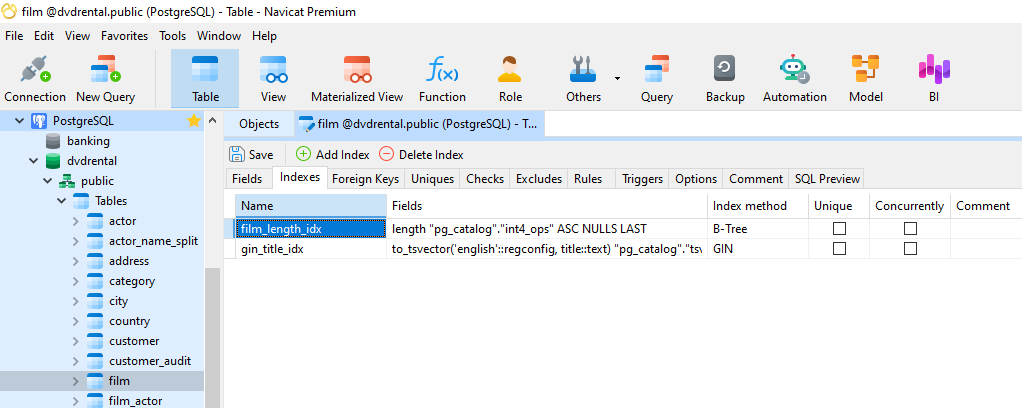
Navicat's Table Designer provides a practical, visual environment for creating and managing all of the index types described above without writing DDL by hand. Indexes are handled on a dedicated Indexes tab within the designer, kept separate from the Fields tab where columns are defined. This separation makes it easy to review a table's indexing strategy at a glance.
To add an index, you give it a name, select the column or columns it should cover, and choose the index type and method from drop-down menus. Crucially, the available options in those drop-downs are tailored to the specific database you are connected to. If you are working in MySQL, you will see the index types MySQL supports; switch to a PostgreSQL connection and the options reflect PostgreSQL's capabilities, including B-tree, hash, GIN, GiST, and others. This context-aware behaviour means you are not left guessing which options are valid for your target database.
For composite indexes, you can add multiple fields to a single index entry and reorder them to match your intended column priority - which, as covered above, directly affects whether and how the index gets used. Primary key columns are visible on the Fields tab, where they are clearly marked, while all secondary indexes live on the Indexes tab.
Conclusion
Good indexing is less about adding more indexes and more about adding the right ones. B-tree indexes cover the vast majority of everyday query patterns; hash indexes earn their place in narrow exact-match scenarios; partial indexes keep things lean when you only ever query a subset of your data; and composite indexes, when ordered correctly, can do the work of several single-column indexes at once. Understanding these distinctions, and using a tool like Navicat's Table Designer to implement and validate them efficiently, puts you in a strong position to keep your queries fast as your data grows.





