




Database work has traditionally been a highly centralized discipline. DBAs and developers sat near each other, shared the same internal network, and could hand off work with minimal effort. That model has changed considerably. Teams are now routinely spread across cities, time zones, and continents, and the practices that worked in a shared office environment don't automatically translate to distributed ones. Getting collaboration right in this context requires deliberate process design, clear conventions, and tooling that bridges the physical distance without sacrificing security or consistency.
Establish Shared Standards Before Shared Work
The most persistent source of friction in distributed database teams is inconsistency whether that means queries written in incompatible styles, naming conventions that vary between team members, connection configurations that work on one person's machine but not another's. These problems compound over time and become significantly harder to untangle the longer they go unaddressed.
The most effective remedy is to establish shared standards before the team starts building on top of them. This means agreeing on SQL formatting conventions, object naming patterns, and how different types of database work - schema changes, query development, data model updates - should be structured and reviewed. Documentation of these standards should live somewhere central and accessible to the whole team, not in someone's head or local files.
Treat Queries and Scripts as Shared Assets
In many teams, queries and SQL scripts exist as private files on individual laptops, emailed back and forth, or pasted into chat messages. This makes it nearly impossible to know which version of a query is current, who last modified it, or whether a particular script has been tested against production data. The result is duplicated effort, inconsistent results, and a significant knowledge-loss risk when team members leave.
Treating queries as shared, centrally stored assets, much like how development teams treat application code, changes this dynamic substantially. When everyone on the team can access the same query library, updates are visible to all, duplication is reduced, and the institutional knowledge embedded in well-crafted queries is preserved rather than siloed.
Build Clear Handoff and Review Processes
Distributed teams often struggle with handoffs, which are the points in a workflow where one person finishes their part and another picks it up. In a colocated team, these transitions happen naturally through conversation. In a distributed team, they need to be explicit. This is especially true for high-stakes database work like schema changes or data migrations, where an undocumented assumption can cause serious problems downstream.
Building lightweight review processes, where significant changes are reviewed by at least one other team member before being applied, catches errors that the person who wrote the change is often too close to see. It also spreads knowledge across the team, so that critical database objects aren't understood by only one person.
Manage Access Carefully Across Time Zones
In a distributed environment, team members from different regions will inevitably be accessing the same database systems at different times, sometimes without another team member available to help if something goes wrong. This makes access control even more important than in colocated environments. The principle of least privilege, i.e., giving each team member access only to what their role requires, limits the blast radius of mistakes made during off-hours work when oversight is minimal. Clear documentation of who has access to what, and why, also makes it easier to review and update permissions as the team changes.
How Navicat On-Prem Server 3.1 Supports Distributed Teams
Navicat On-Prem Server 3.1 is built specifically to address the collaboration challenges that distributed database teams face. Its core function is to act as a private, self-hosted hub through which team members share the objects they work with every day: connection settings, queries, code snippets, data models, aggregation pipelines, and BI workspaces. Because the server runs on the organization's own infrastructure rather than a third-party cloud service, teams with strict data governance requirements can get the collaboration benefits of a shared platform without routing internal database objects through external systems.
The platform organizes work into projects, and each project has its own membership and access controls. Team members are assigned one of three roles - Can Manage and Edit, Can Edit, or Can View - which precisely scopes what each person can do within the project. This maps directly onto the principle of least privilege and makes it straightforward to give distributed contributors the access they need for their role without broader permissions that aren't necessary.
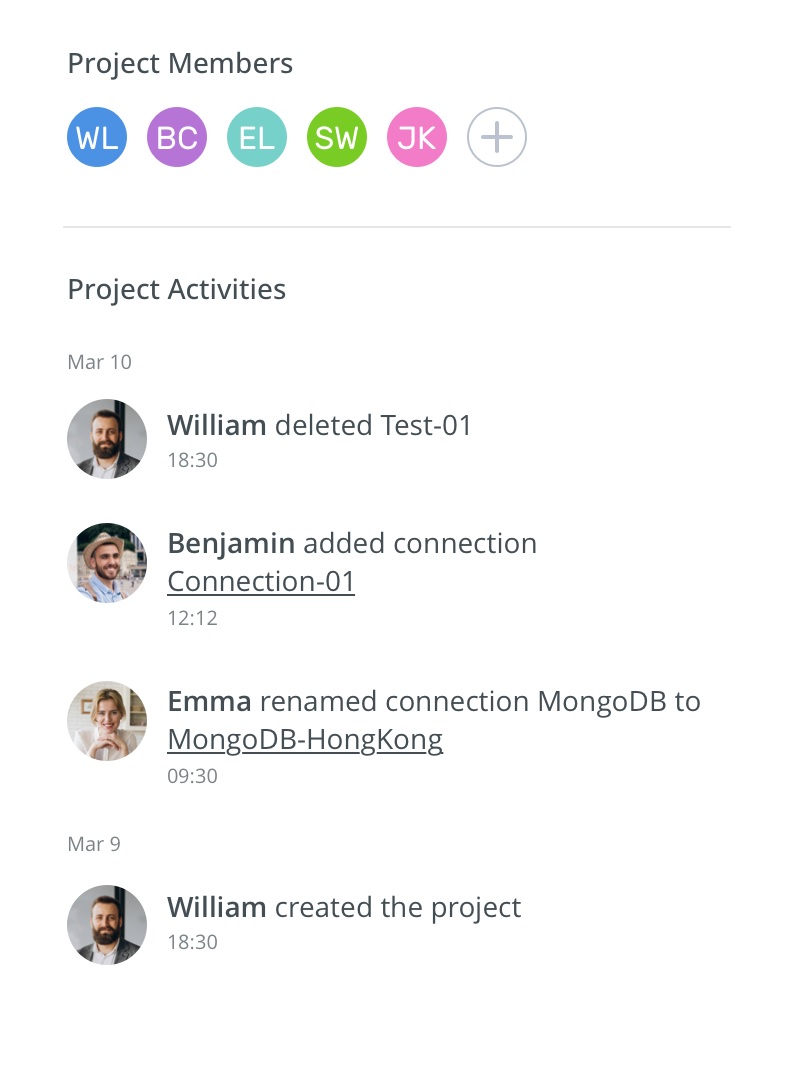
One of the more practically useful features for distributed teams is the real-time Activity Log, which tracks all collaborative actions taken within a project. When team members are working across different time zones and can't always communicate synchronously, the Activity Log provides visibility into what has changed, who changed it, and when - effectively creating the paper trail that handoffs depend on.
The platform also supports SMS and email notifications for project invitations, security events, and server updates, keeping distributed team members informed without requiring them to be actively monitoring the interface.
For organizations that manage users through a central identity system, Navicat On-Prem Server 3.1 supports authentication via LDAP and Microsoft Active Directory, meaning user provisioning and deprovisioning can be handled through existing IT infrastructure rather than managed separately in the platform. All Navicat desktop clients - on Windows, macOS, and Linux - can connect to the server, so team members working on different operating systems can participate in the same collaboration environment without any platform-specific limitations. Version 3.1 also added AI Assistant and Ask AI features, making AI-assisted query writing and explanation available within the on-prem environment for the first time.
Conclusion
Effective database collaboration in a distributed environment doesn't happen automatically. It requires deliberate investment in shared standards, centralized assets, clear processes, and access controls that reflect the realities of a team that isn't in the same room. The teams that get this right tend to be those that treat collaboration as a first-class concern rather than something to figure out as problems arise, and who back that mindset up with tooling that is genuinely designed for the distributed context rather than adapted from a colocated one.





