


Most development teams version-control their application code without a second thought. Pull requests, commit history, and branching strategies are all standard practice. Yet the database schema that underpins that application is often managed through a combination of manual changes, informal notes, and collective memory. When something breaks, or when a new developer joins the team, that approach tends to fall apart quickly. This guide explains what schema version control is, why it matters, and how to build it into your workflow using SQL scripts generated with Navicat.
What Is Schema Version Control?
Schema version control means treating your database structure - tables, indexes, views, stored procedures, constraints - as code that is tracked in a version control system like Git, with the same rigour as your application source files. Every change to the schema is captured as a discrete, human-readable SQL file, committed with a meaningful message, and stored alongside the rest of your codebase.
The result is a complete, auditable history of how your database has evolved: who added which column, when a foreign key was introduced, what the schema looked like prior to the last deployment. More practically, it means any developer on the team can check out the repository and know exactly what state the database should be in.
Two Approaches: State-Based and Migration-Based
There are two broad approaches to schema version control, and understanding the difference helps you choose the right one for your team.
The state-based approach keeps a single SQL file (or set of files) that represents the current, complete schema. When the schema changes, the file is updated and the new version is committed. This is simple to understand, but applying changes to an existing database requires comparing the desired state to the current state.
The migration-based approach represents each change as a separate, sequentially numbered migration script: a script to add a column, a script to create an index, a script to rename a table... Each change is its own file, applied in order. This approach is more complex to manage but gives you a precise, step-by-step history of every change and makes it straightforward to move a database forward from any point in its history.
In practice, many teams use a hybrid: a migration-based workflow for incremental changes, with a full schema dump periodically committed as a reference snapshot.
Why It Matters for Teams
Without schema version control, database changes become a coordination problem. Two developers working on separate features might both alter the same table. A change gets applied to production but never documented, and the development database drifts out of sync. A new environment needs to be set up and nobody is quite sure what sequence of changes produced the current schema.
Version-controlling the schema solves all of these. Changes go through the same review process as code, which usually entails a pull request, code review, and finally, a merge. Every modification is recorded in your Git repository with a timestamp, an author, and a commit message explaining why the change was made. Reproducing any environment from scratch is simply a matter of running the scripts in order.
How Navicat Supports a Schema Version Control Workflow
Navicat works in tandem with Git by providing a set of tools that make generating your scripts accurate, fast, and reliable, which is where most of the friction in a schema version control workflow originates.
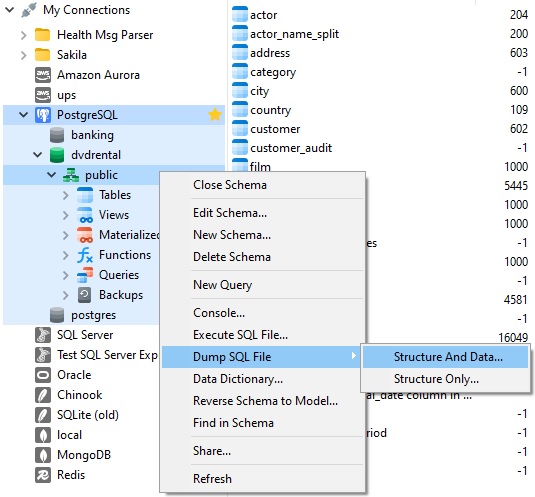
The most direct route is Dump SQL File. This exports the complete DDL for your database objects - tables, views, functions, procedures, and more - as a plain SQL file. That file can be dropped straight into your Git repository as a full schema snapshot. For the state-based approach, this is often all you need: make a change, dump the schema, commit the updated file!
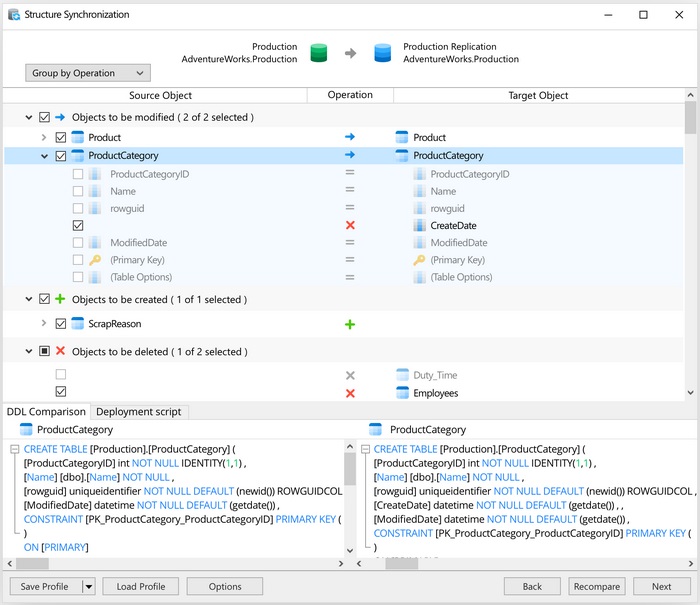
For a migration-based workflow, the Structure Synchronization tool is more useful. It compares two databases side by side - for example, your development database against your staging database - identifies every structural difference, and generates a SQL script that would bring the target in line with the source. Rather than writing ALTER TABLE statements by hand, you make changes in your development environment using Navicat's visual table designer, then use Structure Synchronization to produce the migration script automatically. That script becomes your next numbered migration file, ready to be reviewed and committed.
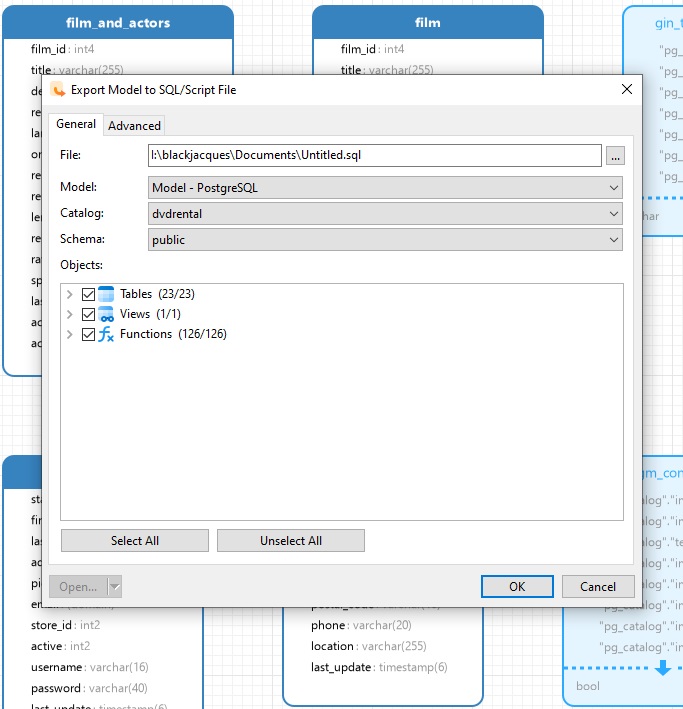
Navicat Data Modeler adds another resource for teams that design schemas visually before implementing them. Once a physical model is ready, its Export Model to SQL/Script File feature generates the full creation script for the modelled schema, with control over which components to include, such as referential integrity rules, comments, character sets, and more. The resulting file is clean, consistent, and immediately suitable for committing to a repository or running against a fresh database.
Across all of these workflows, the underlying principle is the same: Navicat handles the translation from visual schema design or live database state into SQL that Git can track. You get the benefits of a graphical tool without sacrificing the auditability and collaboration that version control provides.
Conclusion
Getting started with schema version control does not require a radical change to how your team works: pick a folder in your repository, start committing schema scripts, and build from there. Using Navicat's script generation and structure synchronization tools to produce those scripts consistently removes the manual effort that makes the practice hard to sustain, and keeps your database's history just as legible as the rest of your codebase.