


Hybrid Model
Naming Standards & Glossary
Bulk Editor
New Table Actions
Import SQL to Model
Alignment Guide
The Hybrid Model: One Workspace, Two Perspectives
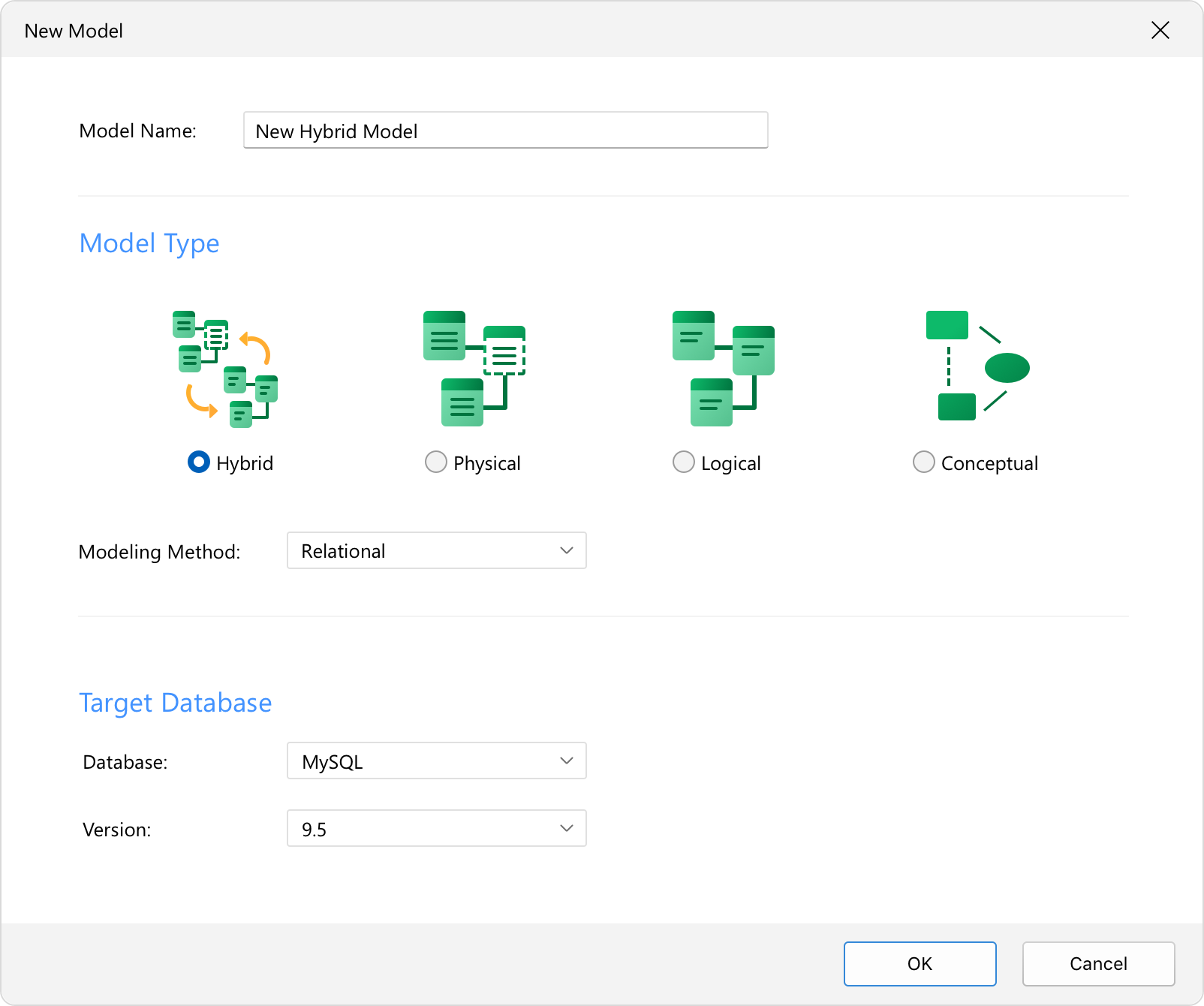
The brand-new Hybrid Model bridges the gap between logical design and physical database construction. You can now manage your abstract logical ideas and your actual physical database structures side-by-side in a single, unified workspace.
All-in-One Workspace:
Design logical entities alongside actual physical objects - like tables, views, and functions - without switching files or duplicating your work.
Seamless Mapping:
Instantly see how your logical designs map directly to deployable physical database schemas, keeping both perspectives perfectly in sync.
All-in-One Workspace:
Design logical entities alongside actual physical objects - like tables, views, and functions - without switching files or duplicating your work.
Seamless Mapping:
Instantly see how your logical designs map directly to deployable physical database schemas, keeping both perspectives perfectly in sync.
Naming Standards & Glossary in Hybrid Models
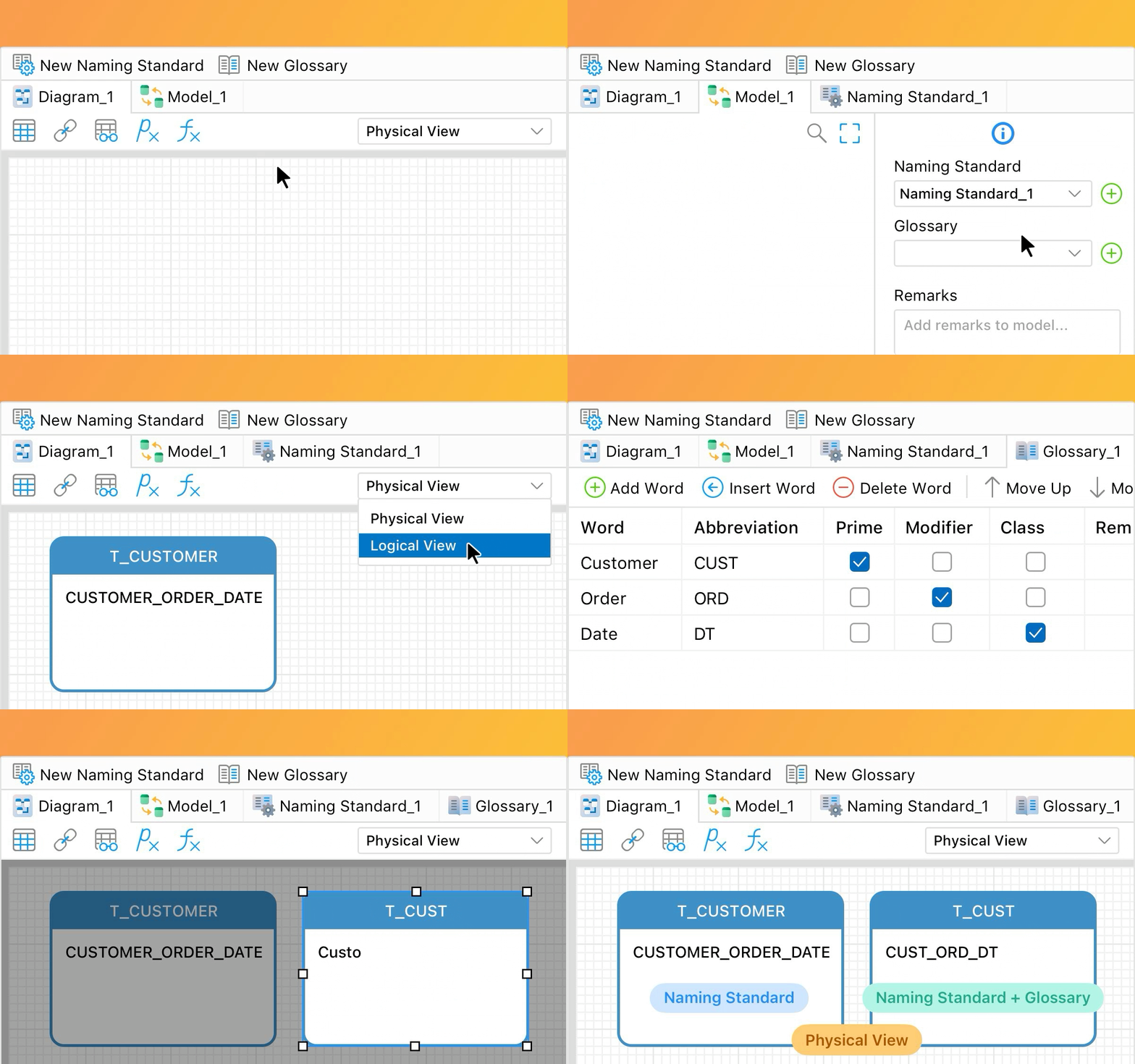
Keep your database schema perfectly organized, consistent, and easy to search as you design. Instead of manually policing style guides, focus purely on building your model while Navicat handles the formatting behind the scenes.
Standardize as You Design:
Draft your models using natural business terms and let Navicat automatically convert to your naming rules. It intelligently parses your phrases - detecting spaces, case shifts, or custom characters - to apply your team’s exact casing blueprints and prefixes.
Centralized Glossary:
Eliminate communication gaps by keeping business and technical teams aligned. Access a shared dictionary of data elements directly on your canvas to ensure every term matches official business definitions from day one.
Share Design Blueprints:
Keep everyone in sync by easily importing pre-approved business dictionaries via CSV to jumpstart your design, or exporting your glossary for quick backups.
Standardize as You Design:
Draft your models using natural business terms and let Navicat automatically convert to your naming rules. It intelligently parses your phrases - detecting spaces, case shifts, or custom characters - to apply your team’s exact casing blueprints and prefixes.
Centralized Glossary:
Eliminate communication gaps by keeping business and technical teams aligned. Access a shared dictionary of data elements directly on your canvas to ensure every term matches official business definitions from day one.
Share Design Blueprints:
Keep everyone in sync by easily importing pre-approved business dictionaries via CSV to jumpstart your design, or exporting your glossary for quick backups.
Bulk Editor
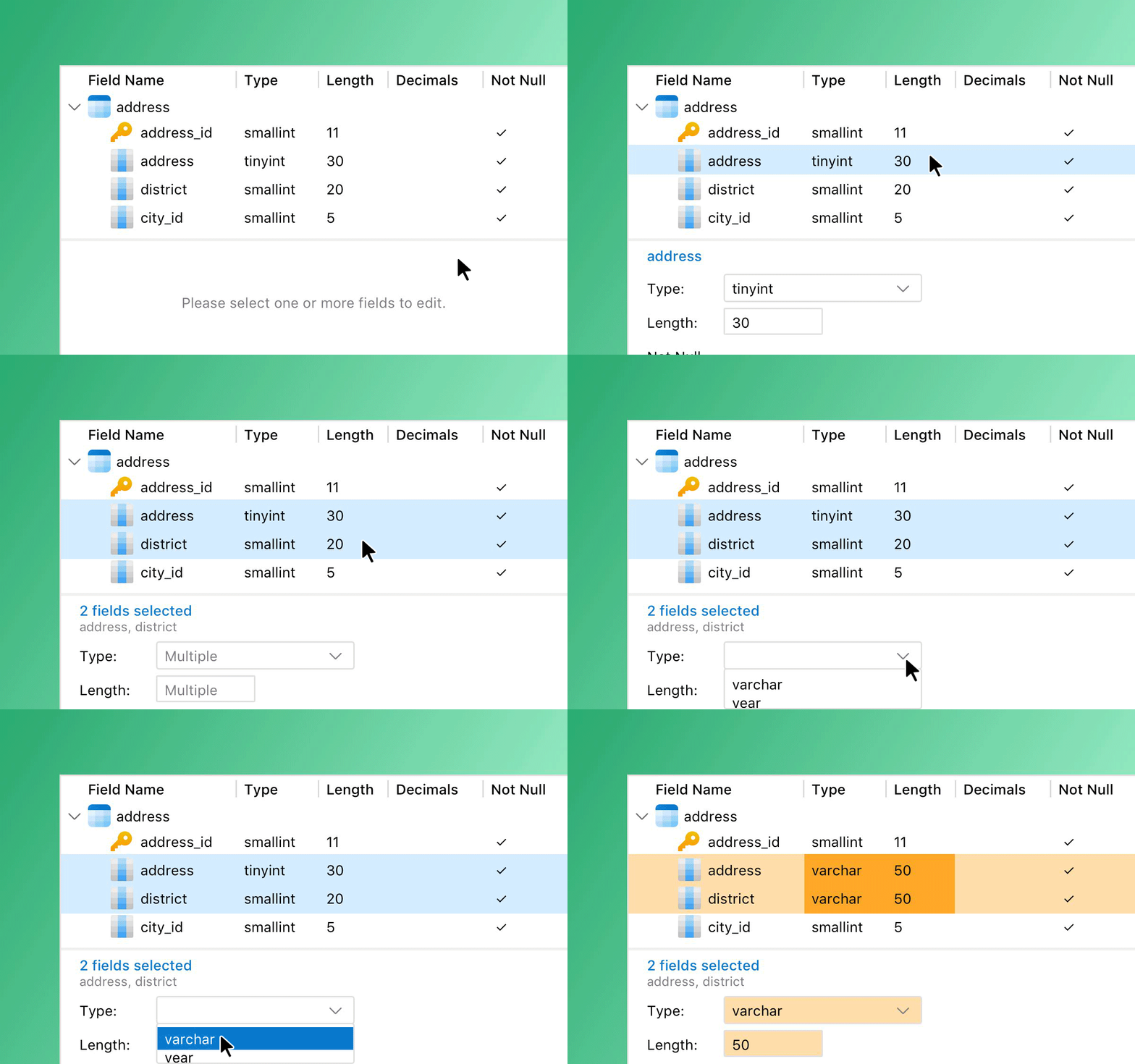
Streamline heavy architectural updates with a single, centralized workflow. Modify fields across your entire model without opening tables one by one.
Hierarchical View:
View and manage every field across multiple tables simultaneously from a single, structured list.
Rapid Editing & Filtering:
Use specialized toolbar toggles to filter, arrange, and edit field properties instantly, wiping out hours of tedious clicking.
Hierarchical View:
View and manage every field across multiple tables simultaneously from a single, structured list.
Rapid Editing & Filtering:
Use specialized toolbar toggles to filter, arrange, and edit field properties instantly, wiping out hours of tedious clicking.
New Table Actions
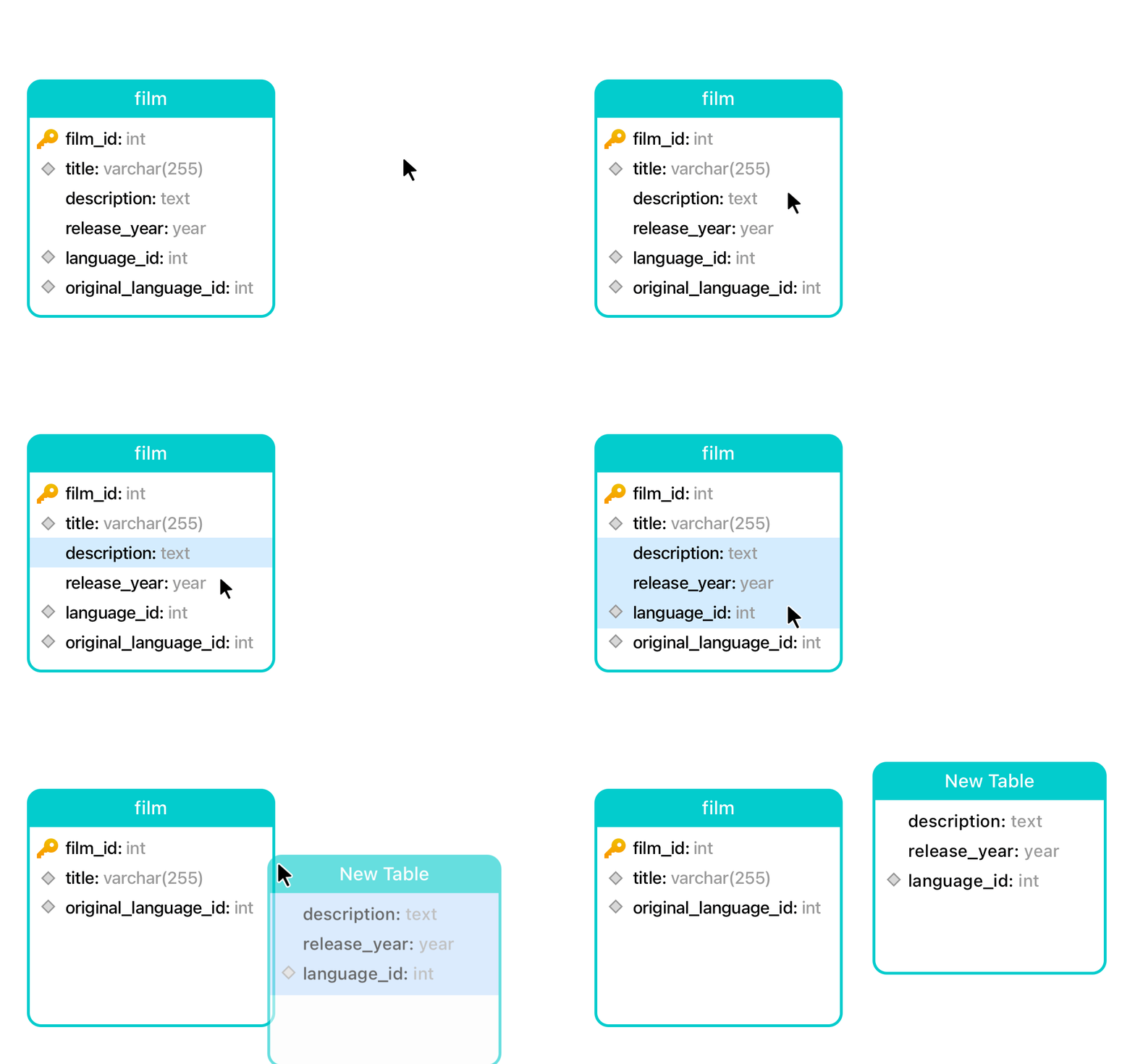
Rearrange your table structure as naturally as sketching. Quickly organize your tables with quick, intuitive drag-and-drop actions directly on the canvas.
Create New Tables Instantly:
Select a table on the canvas, highlight specific fields, and drag them out to any empty space on the canvas to instantly generate a brand-new table.
Move Fields Between Tables:
Easily reorganize your schema by highlighting specific fields and dragging them directly into another table.
Duplicate on the Fly:
Hold Ctrl / Cmd while dragging to duplicate fields instantly instead of moving them.
Create New Tables Instantly:
Select a table on the canvas, highlight specific fields, and drag them out to any empty space on the canvas to instantly generate a brand-new table.
Move Fields Between Tables:
Easily reorganize your schema by highlighting specific fields and dragging them directly into another table.
Duplicate on the Fly:
Hold Ctrl / Cmd while dragging to duplicate fields instantly instead of moving them.
Import SQL to Model
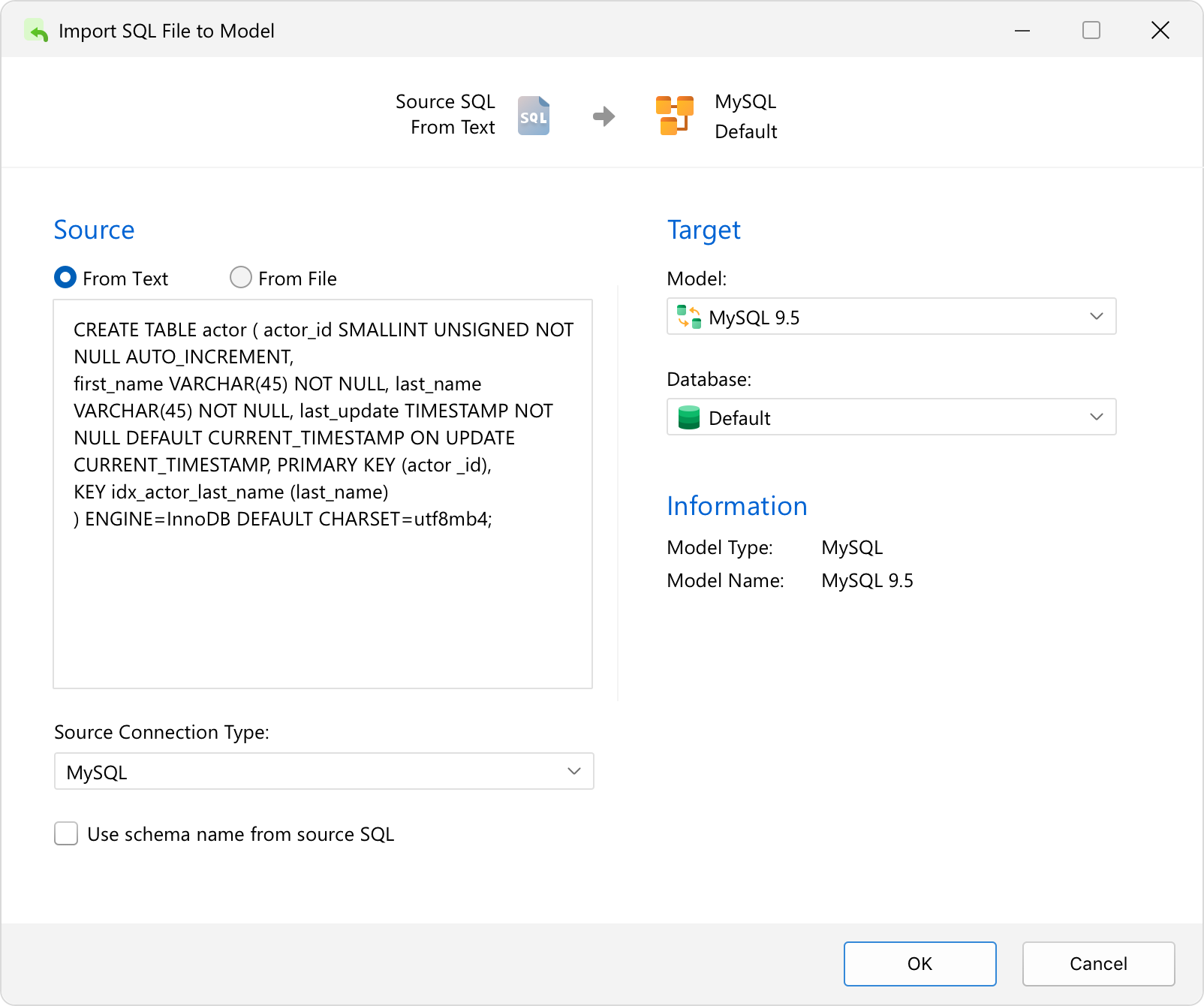
Instantly turn raw SQL scripts into beautiful, structured database models through a simple, step-by-step reverse engineering wizard.
Flexible Input Sources:
Simply paste your raw DDL SQL statements directly into a text block, or import an existing .sql script file.
Instant Visualization:
Seamlessly convert script text into structured tables and diagram elements, saving you from rebuilding complex database structures by hand. You can easily generate a brand-new diagram or add the objects straight into an existing one.
Flexible Input Sources:
Simply paste your raw DDL SQL statements directly into a text block, or import an existing .sql script file.
Instant Visualization:
Seamlessly convert script text into structured tables and diagram elements, saving you from rebuilding complex database structures by hand. You can easily generate a brand-new diagram or add the objects straight into an existing one.
Alignment Guide
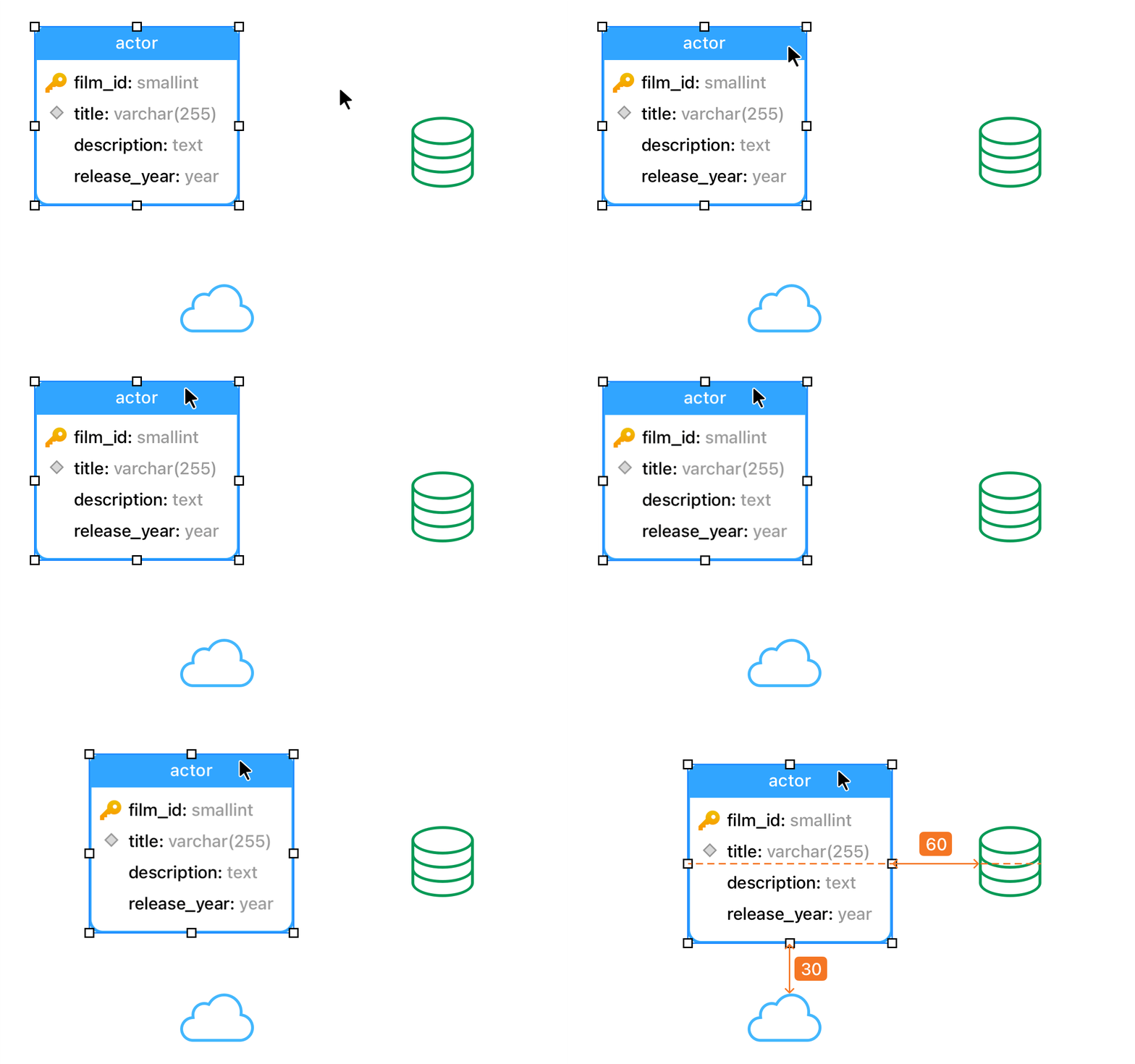
The new Alignment Guide takes the frustration out of manually lining up table boxes. By displaying helpful layout lines the moment you move or resize any item, it completely eliminates the guesswork so you can keep your canvas perfectly organized.
Perfect Snapping:
Position your items accurately by snapping them perfectly into place on your canvas.
Flawless Layouts:
Eliminate messy gaps and overlapping elements for a clean, presentation-ready diagram instantly.
Perfect Snapping:
Position your items accurately by snapping them perfectly into place on your canvas.
Flawless Layouts:
Eliminate messy gaps and overlapping elements for a clean, presentation-ready diagram instantly.